
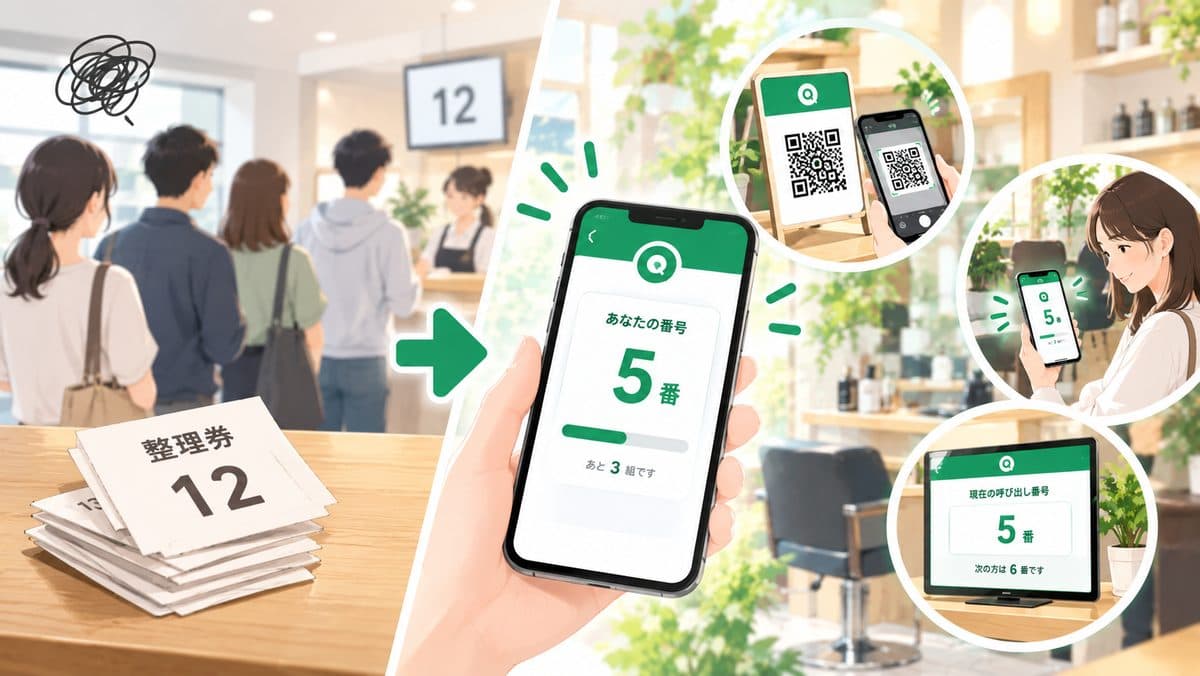
4 Common Problems with Paper Numbered Tickets
Preparation and handout take real effort
Paper tickets cost you both prep time and staff on the day:
- Printing and cutting numbered tickets in advance
- Assigning someone to hand them out and keep track of issued numbers
- Managing leftover tickets and which numbers have gone out
For small teams running an event or shop, dedicating one person just to handing out tickets is a real burden.
Lost tickets turn into disputes
Tickets are small scraps of paper — they get lost, or rain and sweat smudge the number. When someone says "I lost it, but I'm pretty sure I was number 42," there's no way to verify it from paper alone, which puts staff and the people behind them in an awkward spot.
No one knows which number is up
With paper, the only way to share progress is a staff announcement or a handwritten board.
- People who stepped away have no idea how far the line has moved
- Staff get flooded with "Is it my turn yet?" questions
- In the end, nobody dares to leave the area until they're called
You call a number and nobody answers
Calling out a number to no response is one of the most common frustrations with paper tickets. While you decide whether to skip them or wait, the whole line stalls.
What Changes When You Go Digital?
A digital numbered ticket turns each customer's phone into the ticket itself. Compared with paper, here's what changes.
Scanning a QR code issues a number
Customers scan the posted QR code, enter their party size, and receive a number. No app install and no account sign-up — it all runs in the browser. On your side, there's nothing to print and no one needed at a handout desk.
Customers can check their place at any time
After joining, the customer's screen shows their number, their current position ("You're #3"), and how many groups are waiting. They can also see the list of recently called numbers, so they know exactly how far the line has moved.
Customers notice when they're called
If the page is open, the moment they're called their phone plays a chime and vibrates (on supported devices). If they allow Web Push notifications, they get the call even with the screen closed — so they can browse the venue or wait nearby.
Note: to receive Web Push notifications on iPhone (iOS Safari), customers need to add the queue page to their Home Screen first.
Staff stop tracking numbers by hand
Issuing numbers, keeping the order, and recording who's been called are all handled by the system. Staff just tap "Call next party" in the admin screen — and there's no more checking whether a "lost ticket" claim is real.
4 Things to Check When Choosing a Digital Ticket Tool
1. Can you start for free, without registration?
Events and limited-time sales often only need a tool for a single day. Monthly contracts or approval processes can eat up your prep time. Being able to start free, right away, with no account is a major factor.
2. Does it avoid forcing customers to install an app?
Asking people to install an app just to get a ticket slows down the front of the line and makes congestion worse. Make sure customers can join from a QR code in the browser.
3. Can you serve people without smartphones as easily as with paper?
Some people will always be unable to join by QR — older visitors, children, someone with a dead battery. With a staff-entry feature that lets staff add them on their behalf, you just type a name and party size and they join the same line as everyone else.
4. Can you display the current number on-site?
So people who aren't looking at their phones can still follow along, check whether you can show the current number and the number of waiting groups in large type on a tablet or display. If the check-in QR code fits on the same screen, one device covers both check-in and signage.
Hands-On: Going Digital with Queueue
Here's how to replace paper tickets with Queueue, a free queue system that requires no registration.
Step 1: Create your shop (or event)
Enter your event or shop name on the top page, and you'll instantly get an admin screen and a customer-facing queue URL. No sign-up or credit card required.
Keep the admin URL private and share it only with your staff.
Step 2: Post the QR code
Print the QR code for your queue URL and post it at the front of the line or the entrance. See how to print QR codes for the steps.
If you have a tablet or a portrait display, we also recommend showing the poster screen. It combines the QR code, check-in steps, the number currently being called, the number of waiting groups, and recent calls on one screen, and it updates automatically in near real time — a drop-in replacement for a handwritten "Now serving" board.
Set up your free digital ticket page now
Create your shop for freeStep 3: On the day, call groups and handle no-shows
- Everyone who joins appears automatically in the admin list with their number, party size, and check-in time
- Tap "Call next party" to call groups in order — or call a specific group individually when needed
- Mark arrivals as "Complete," and groups that don't show up after being called as "No-show / cancel"
Customers marked as a no-show see a notice on their phone and can rejoin the line right from the same page. That helps avoid the classic paper ticket argument of "You skipped me!" — "No, we called you."
Tips for Switching from Paper
Keep paper-style and digital entries in the same line
If you're not ready to ask everyone to join by QR, start by having staff add only the people who can't use their phones. QR joiners and staff-added entries are managed together in a single line (queue), so there's no risk of the order getting mixed up between paper and digital. For more, see using Queueue as an alternative to paper lists.
Use "Stop acceptance" to end distribution, and business hours for time windows
- When your slots are full, switch the shop to stop acceptance in the admin settings to block new entries
- Set your check-in start and end times as business hours, and entries outside that window are closed automatically
The system takes over the job of the "Tickets are all gone" sign.
Remind people to turn on notifications
The waiting screen shows a prompt to allow Web Push notifications. A quick line on your signage or from staff — "Turn on notifications and you'll get the call even if you step away" — noticeably reduces no-shows.
Know when it's not the right fit
Queueue is built for calling people in the order they joined. It doesn't support handing out tickets in advance for specific time slots ("Entry from 2:00 PM") or distributing tickets by lottery. If you need those, it's more realistic to pair it with a dedicated reservation or lottery system.
FAQ
Q. How many tickets (groups) can I issue?
There's no limit on the number of groups. Each group can enter a party size from 1 to 99.
Q. How do I handle people without smartphones?
Use the staff-entry feature in the admin screen. Enter a name and party size and they join the same line, so you can call them by name.
Q. What happens to someone who missed their call and wandered off?
When you mark them as a no-show in the admin screen, a notice appears on their phone, and they can rejoin the line from the same page.
Q. Is it really free? Do I need an app?
Yes, it's free. Both customers and staff use it entirely in the browser — no app install or account sign-up required.
Summary
Going digital with numbered tickets comes down to three things:
- Turning customers' phones into tickets, eliminating printing, handouts, and lost tickets
- Making "which number is up" visible on phones and the poster screen
- Adding people without smartphones via staff entry, in the same line
You don't need dedicated hardware or a big setup. For your next event or merch sale, try starting with a single QR code instead of paper tickets.
For a school-festival walkthrough, see our school festival queue system guide. If you're curious how other tools compare, see our queue system comparison guide. If you'd rather not run a LINE official account, take a look at our no-LINE queue system comparison.